Telenor's Developer Platform
AI Support Agent
Support is a tedious but necessary task, which allows us to learn from and understand how our users are consuming our products. While users are usually rightfully seeking out help or asking us questions, we have solid documentation that intends to answer most questions. We wanted to see if we could put that documentation better to work as part of our support workflow, through an Innovation Days project.
The Idea
We had an idea he put on the Innovation Days board: create a bot capable of handling incoming support requests, with access to our internal documentation and support history through Retrieval-Augmented Generation (RAG) using Google Cloud Datastore and Vertex AI Search with the Gemini 2.5 Pro model. We also had the idea that we could embed a similar agent directly into our Docusaurus documentation site, allowing users to get help without searching through docs manually.
Since this was an innovation days project it had to have a deliverable in 2 work days.
Anyone can join an innovation days project and this sparked the interest of 5 people. We had two people on Vertex AI and configuring and massaging our data. 1 on infrastructure, 1 on Docusaurus chat and 1 on Slack integration.
Designing the AI Client
The first step was to configure our Vertex AI instance. Luckily this is relatively easy in Google Cloud, as we simply enabled the service and configured it with some simple options.
With our Vertex AI instance configured and the data normalized and loaded into a datastore, we could create a Python client able to receive Slack messages or requests from a prompt embedded in Docusaurus.
Message Evaluation
Not every message in a support channel needs an AI response. Someone saying "thanks" or asking a colleague to review a PR doesn't need the bot chiming in. We added an evaluation step using a lightweight model (Gemini 2.5 Flash Lite) that decides whether a message is actually a technical question worth answering. The evaluator checks if it's a deployment question, a configuration issue, or a request for documentation, which also ignores social messages, status updates, and requests directed at specific people. We also ask users to evaluate the response from the bot, by using a Slack reaction (👍 / 👎 ), this allows us to understand if the answer actually helped so that we can improve the bot.
Grounding and Citations
A key requirement was that answers must come from our documentation, not from the model's general knowledge. We configured the client to check for valid grounding metadata in every response. If Gemini can't find relevant sources in our indexed docs, it says so rather than making something up. Every answer includes citation links back to the original documentation pages, so users can verify and explore further.
Through the prompt, we also prioritize official Nova documentation over Slack history, the indexed conversations serve as supplementary context for questions the docs don't cover well.
The Slack Bot
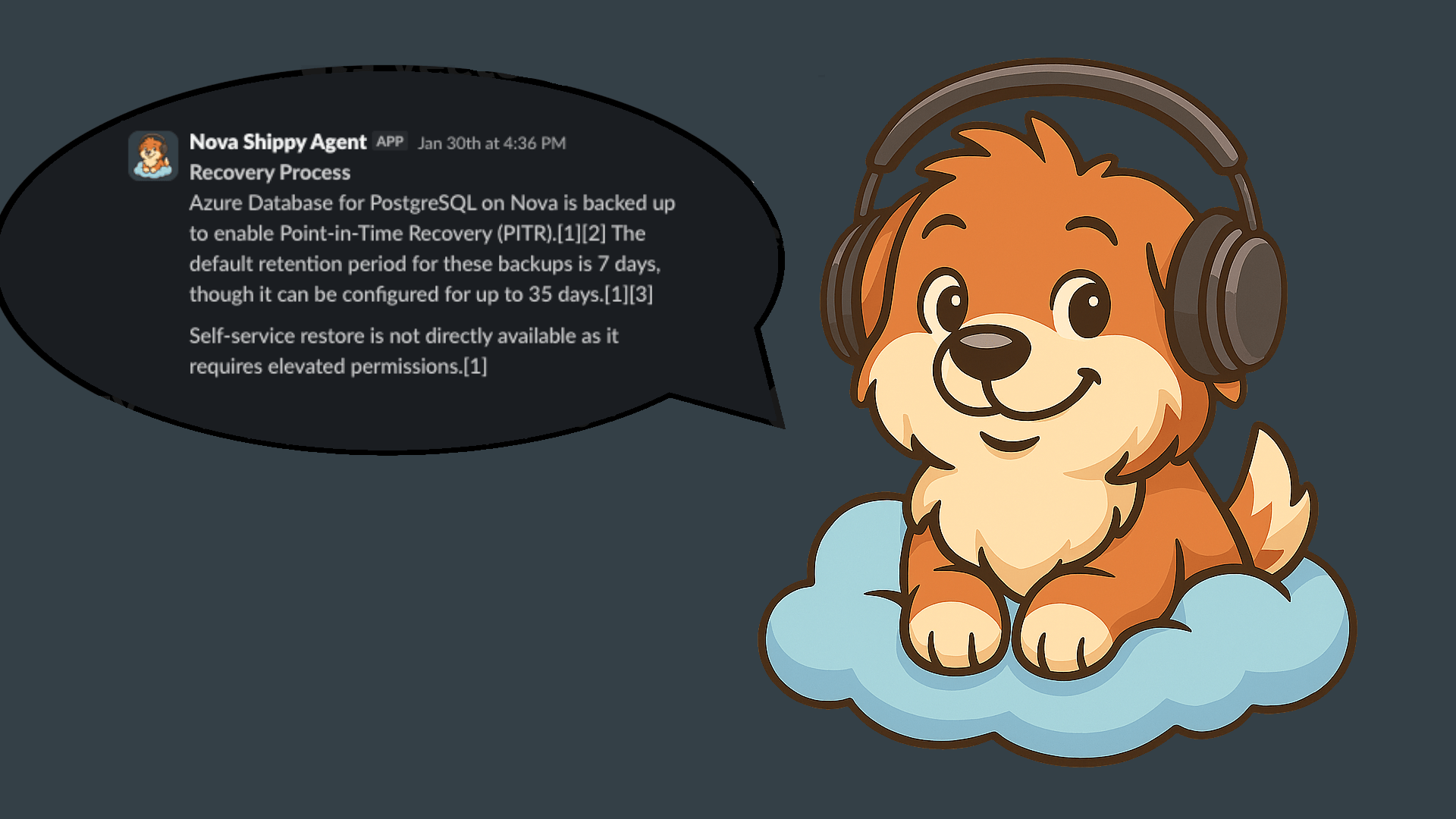
To build the Slack bot, we used the Slack Bolt framework. The bot monitors our #platform-support channel. When a user asks a question, it first runs the evaluation check, then queries Gemini 2.5 Pro with our documentation as grounding context, and responds in a thread with the answer and citation links.
We also index historical Slack conversations from the support channel. A job runs daily at 6 AM, fetching recent messages and loading them into a separate Vertex AI Search datastore. This means the agent can reference not just official documentation, but also previous support conversations, with the intent of capturing tribal knowledge that never made it into the docs.
Thankfully, Slack can display rich messages, which means that the bot is able to be quite informative in its answers, display links and citations in readable sections. A small caveat that we spent quite a bit of time on, was a limitation in how long the Slack replies can be. We had to instruct the AI to deliver short and precise answers. So all in all, it was probably a good thing :)
Embedding GenAI in Docusaurus
For the documentation site, we built a simple REST API using FastAPI that
exposes /chat and /chat/stream endpoints. The streaming endpoint lets us
show responses as they generate, giving users immediate feedback rather than
waiting for the full response.
The API returns both the answer and source citations, so users can verify the information and dive deeper into the original documentation if needed. We exposed this behind a Global Load Balancer, with managed SSL certificates handling HTTPS.
Architecture
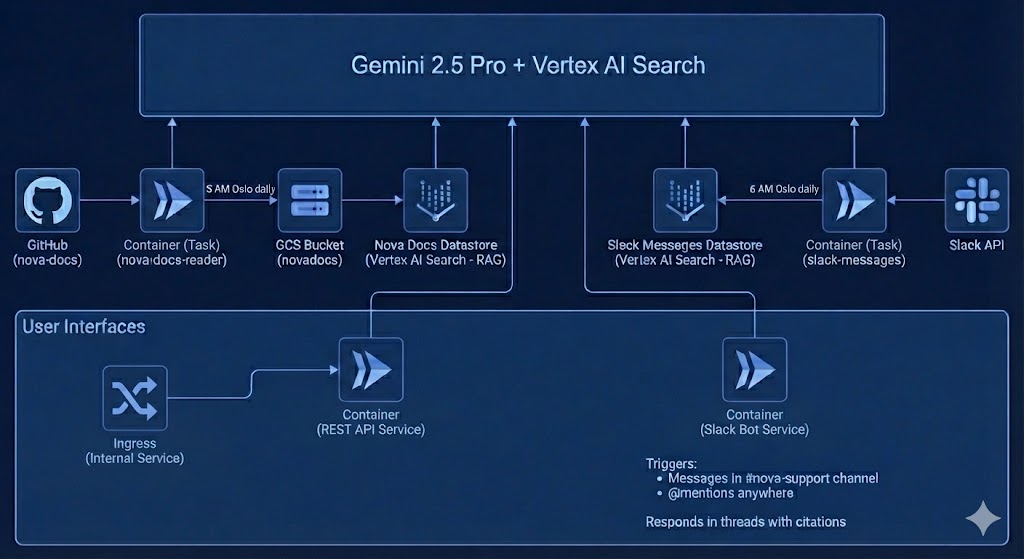
The whole system runs on a container, keeping costs low (we only pay when handling requests) and scaling automatically. Two containers handle the data pipelines: one syncs documentation from our Docusaurus repository and another fetches historical Slack messages. Both feed into Vertex AI Search datastores that Gemini uses for the grounded responses.
We also added Firestore to keep state and configuration, so we will have historical data on prompts we use and answers it generates.
What We Learned
Having citations in every response turned out to be crucial. We expect that users trust the answers more when they can see exactly where the information came from, and it helps them learn where to look for similar questions in the future.
The evaluation step saved us from a lot of noise. Without it, the bot would respond to every message in the channel, which quickly gets annoying. Letting a fast, cheap model decide "is this actually a question for me?" made the experience much better.
What's Next
We're still evaluating how well the agent handles edge cases and questions that span multiple documentation pages. We're also considering adding feedback mechanisms so users can flag unhelpful responses, which would help us identify documentation gaps. If this proves useful, we might expand the approach to other internal tools and documentation sets across Telenor.